
The 5 Review Practices Google Just Made Illegal in 2026
In April 2026, Google made some of the biggest changes to its review policy in years. There was no announcement, no email, no banner. The rules changed.
If you run a local business and ask for reviews in any of the ways most businesses do, there’s a good chance you’re now violating the policy without knowing it.
Five common review practices are now banned: asking for reviews while a customer is still on your premises, using review kiosks or tablets at reception, setting staff review quotas, asking patients to mention specific names or services, and “review gating” (only sending review requests to happy customers). Google’s AI systems now use GPS, IP, and device fingerprinting to catch the first three and reject the reviews that come from them.
What Changed in April 2026
The update happened across two days. On April 16, Google rolled out Gemini-powered moderation that screens reviews before they’re published. On April 17, Google updated its rating manipulation rules with a list of newly banned practices.
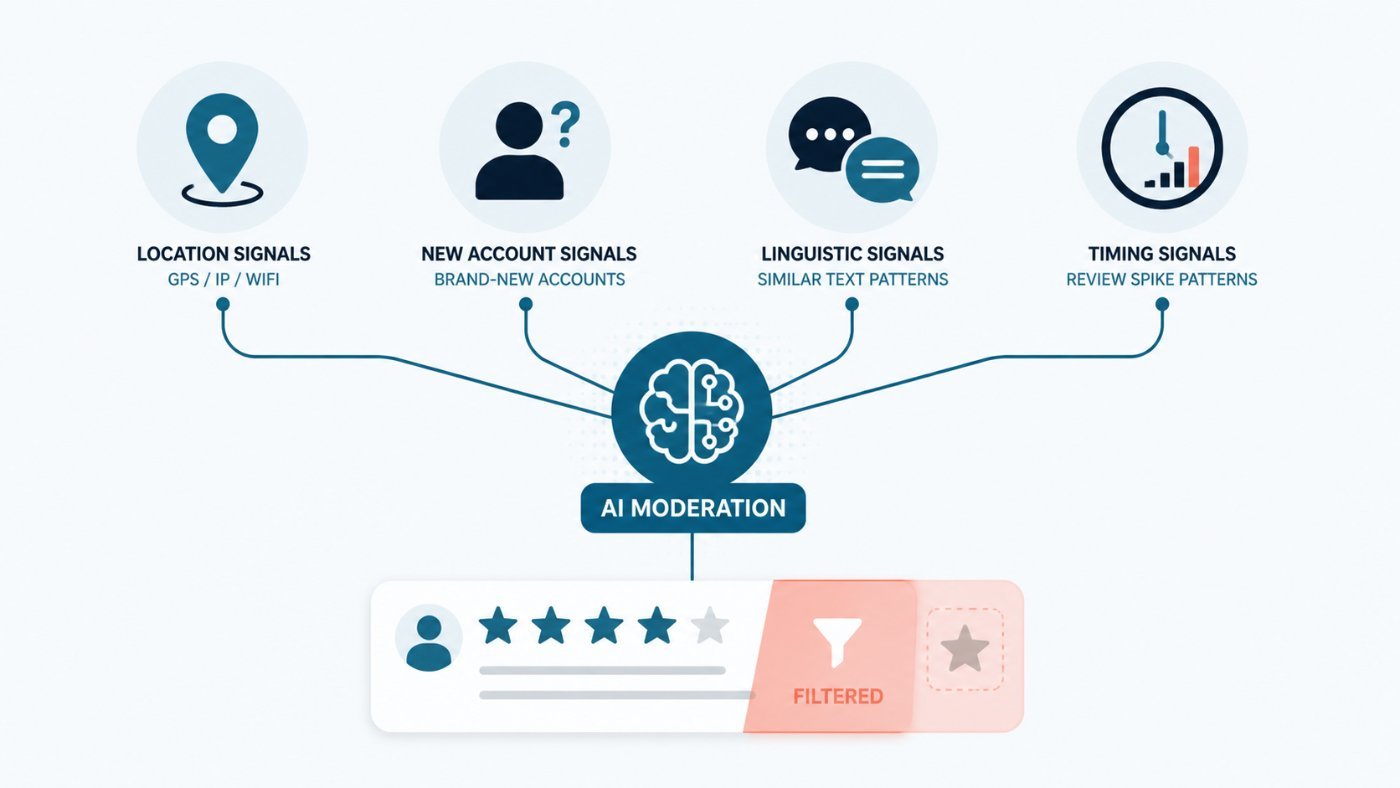
The big shift is that Google’s AI now reads more than the words in a review. It looks at four signals together:
- Location: GPS, IP address, and wifi network. A review submitted from inside your clinic gets flagged.
- Account history: brand-new Google accounts with no prior activity dropping a glowing review on your profile look fake to the system.
- Linguistic patterns: multiple reviews using the same phrasing (“Sarah was amazing”, “I love the laser therapy”) get clustered together as a coordinated batch.
- Timing: spikes in review volume that don’t match your usual patient flow get scrutinized.
If a review matches a banned pattern on any of those signals, it never publishes, even when the wording itself looks fine.
Google’s most recent Trust and Safety Report shows 292 million reviews were blocked or removed in 2025, and that number is climbing in 2026 because the AI moderation is stricter and faster.
The 5 Practices That Are Now Banned
1. Asking for Reviews While the Patient is Still on Site
If a patient leaves a review from inside your clinic, Google can now tell. GPS, wifi, and IP signals match the review back to your business location. The review gets flagged as “pressured solicitation” and may be suppressed.
This was the most common practice for clinics. Hand the patient an iPad before they leave, ask for a review, wave them out the door. That now backfires.
2. Review Kiosks and Tablets at Reception
Same root cause as above. A shared device at your front desk with a “leave us a review” link is now considered a policy violation. Google’s policy language: “merchants should not require or pressure users to leave ratings while on the premises.”
3. Telling Staff to Hit a Review Quota
Telling your front desk team “we need 10 new reviews this week” or running a leaderboard for which practitioner gets the most reviews is now banned. Google specifically calls out “directing staff to solicit a specific number of reviews.”
4. Asking Patients to Mention Specific Names or Services
Telling a patient “if you had a great session with Dr. Smith, please mention her by name in your review” or “make sure to mention the laser therapy” is now banned. Google’s language: “directing staff to request reviews mentioning specific content, including staff names by name.”
Scripted reviews look fake to Google’s AI even when they’re real, and the cleanup catches both.
5. Review Gating
Review gating is the practice of asking happy patients for a Google review and asking unhappy patients for “feedback” through a private form instead. It’s been popular for years because it inflates your public rating.
It’s now explicitly banned. Google calls it sentiment-based filtering and considers it a form of review manipulation.
What You Can Do Instead
The compliant version of asking for reviews works as well, sometimes better:
- Send a follow-up text or email after the visit: a few hours later or the next morning is the sweet spot. The patient is at home, not under social pressure, and the request feels like a thank-you instead of a transaction.
- Put a QR code on a printed receipt or appointment card: printed material the patient takes home is fine. Devices on your premises are not.
- Ask everyone the same way: don’t filter by who you think is happy. Send the same neutral request to every patient and let the reviews fall where they fall.
- Reply to every review (positive and negative): this isn’t new, but it carries more weight now. Replying to negatives is one of the strongest signals to Google that your profile is active and trustworthy.
If you’re using GoHighLevel, Jane, or another booking platform that sends review requests, you’re already compliant on the timing as long as the request goes out after the appointment is closed and you’re not tying it to staff names or quotas.
What Happens If You Get Caught
The consequences scale up the more violations Google detects. Per Google’s own help docs:
- The review gets removed or shadow-filtered: shadow-filtering is the most subtle one: the patient who left the review still sees it on their end, but no one else does. So your patient thinks they helped you out. You think Google ate another review. Neither of you knows what happened.
- You temporarily lose the ability to receive new reviews: existing reviews stay live, but no new ones go through for a set period of time.
- Existing reviews get unpublished for a set period of time on top of the new-review pause.
- A public warning banner appears on your profile telling visitors that fake reviews were removed.
- Repeat or severe violations lead to full profile suspension, which removes the business from Google Maps and local search entirely.
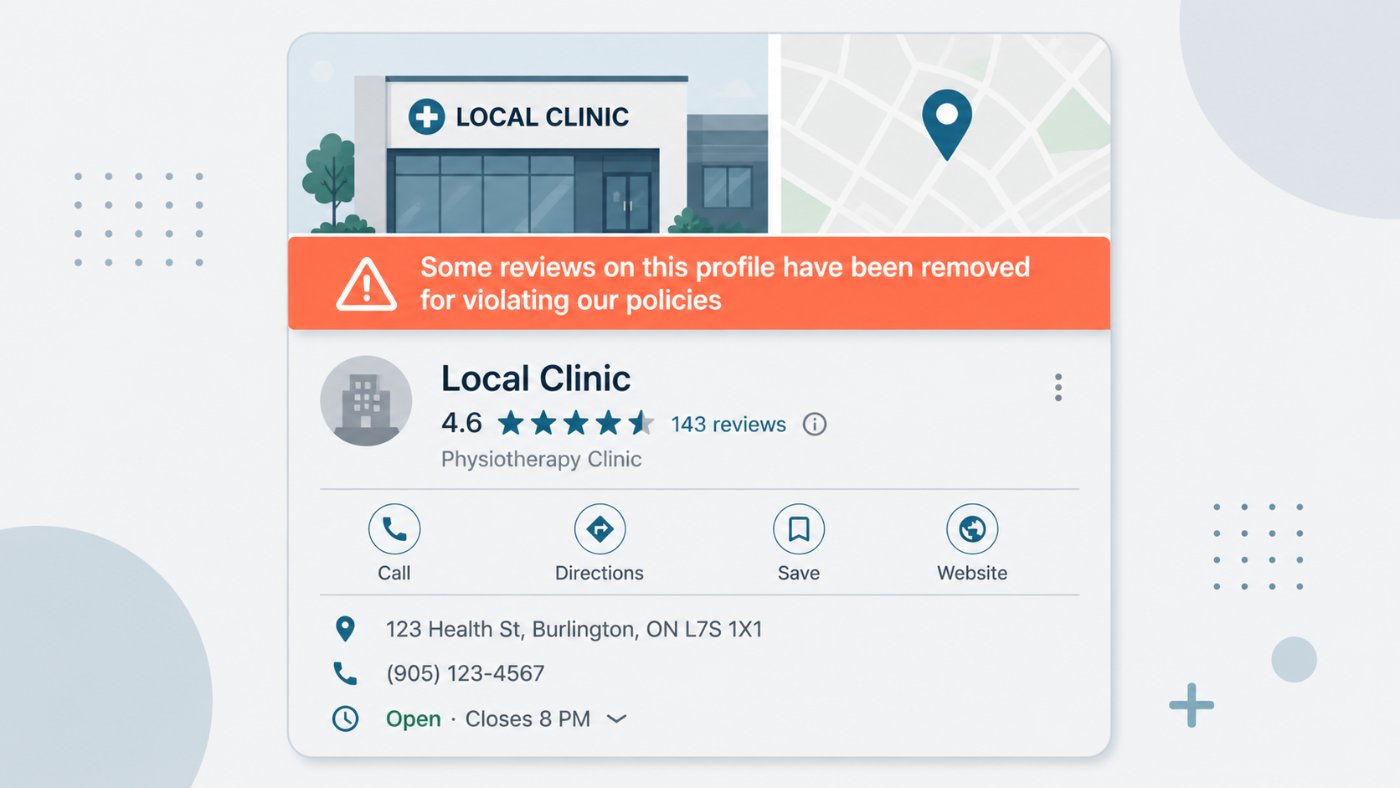
What the warning banner looks like on a public Google Business Profile. Every potential patient searching for your business sees this notice.
The banner is the one to watch. 97% of consumers use reviews to guide their purchase decisions, and a “fake reviews removed” notice on your profile doesn’t inspire much trust. That’s a hit that’s hard to walk back.
Google says profile owners get an email before any restrictions are applied, with a chance to appeal. Worth keeping an eye on the inbox connected to your Business Profile if you have any concern about past tactics.
Frequently Asked Questions About Google Reviews
Is it illegal to ask for Google reviews?
No. Asking for reviews is fine and Google encourages it. What changed is how you can ask. Asking while the patient is still in your clinic, using a tablet at reception, setting staff quotas, or requesting specific wording all violate Google's policy now.
Worth separating two things that get confused. Breaking Google's policy costs you reviews, and in bad cases your profile. It isn't a law. But some review practices are also regulated: the US Federal Trade Commission's Consumer Reviews and Testimonials Rule took effect in October 2024 and carries civil penalties of up to $51,744 per violation for things like buying fake reviews or suppressing negative ones. Canadian clinics fall under the Competition Act's deceptive marketing provisions instead.
Why are my Google reviews disappearing?
Usually one of three reasons. The review tripped the new AI moderation and was never published. It was removed later in a sweep. Or it's shadow-filtered, meaning the patient still sees it on their end but nobody else does.
Reviews left from inside your building are the most common casualty, because location signals flag them automatically. If a batch vanished around April 2026, a kiosk or an on-site request is the first thing to check.
How do I get more Google reviews without breaking the policy?
Ask everyone, ask after they've left, and don't script it. A text or email a few hours after the visit does the work that a reception iPad used to, without the location flag.
The part clinics find hardest is asking unhappy patients too. Filtering by who you think will leave five stars is the practice Google now calls sentiment-based filtering, and it's the one most likely to be read as manipulation.
Does this apply to my clinic if I'm in Canada?
Yes. Google's review policy is global, and the AI moderation doesn't work off your location. The Competition Act covers deceptive marketing in Canada rather than the FTC rule.
One thing that catches Canadian clinics: your regulatory college may have its own rules that are stricter than Google's. Massage therapists in Ontario and BC, for example, are barred from soliciting reviews at all. Check your college's advertising standards before you build any review request into your patient flow.
How do I stop Google review requests going out?
If requests are automated through your booking software, the setting lives in that platform rather than in Google. In Jane it's under the automated email settings, and in GoHighLevel it's the review request workflow.
Turning them off entirely is rarely the right fix. If the concern is compliance, changing when the request fires and what it says solves the problem without giving up the reviews.
Can I still reply to reviews or ask a patient to remove one?
Replying is fine and worth doing on every review, positive or negative. It's one of the few signals that got more valuable after this update.
Asking a patient to take down a negative review is where it gets risky. Under the FTC rule, pressuring someone to remove an unfavourable review counts as suppression and carries penalties. If a review is genuinely fake or breaks Google's content rules, report it through your Business Profile instead.
Where to Go From Here
The path forward for clinic owners is short:
- Take down any review kiosks or tablets at reception.
- End staff review quotas this week.
- Move review requests to a post-visit text or email through your booking system. Most clinics on Jane or GoHighLevel can switch this on without much work, and a platform like Cliniverse Connect runs the compliant review automation for you out of the box.
- Review your past request scripts. Anything that mentions a name or asks for specific content needs to come out.
The clinics that adapt quickly have an advantage in the next year. Compliant review systems mean reviews that publish, and reviews that publish are still the biggest local SEO signal you can build.
If you want help moving your review system to something compliant and consistent, we run done-with-you marketing for clinics. We help the review automation, the patient flow, and the rest of the marketing system around it.
Related Articles
 Get Found Online
The Truth About Google Reviews for SEO and AI in 2026
Yes, Google reviews help SEO and now influence AI search citations too. Benchmark data + what to do this week for local businesses.
Tyler · April 27, 2026
 Get Found Online
Apple Business Launched: What It Means for Local Businesses
Apple just folded Business Connect, Manager, and Essentials into one free platform called Apple Business, and Maps ads are rolling out this summer.
Tyler · April 17, 2026
 Get Found Online
How to Help Your Clinic Rank Higher With Google Business Profile in 2026
If patients cannot find your clinic on Google Maps, here's what to check on your Google Business Profile and how to fix it, step by step.
Tash · September 12, 2026
Run Your Own Clinic Marketing
Cliniverse gives you the ads, posts, courses, and AI to grow your clinic, with experts on call. You own everything you build.